

iPad Bright Spot Issue Explained: Causes, Common Errors, Real User Complaints & Proven Fixes (Complete Technical Guide 2026)
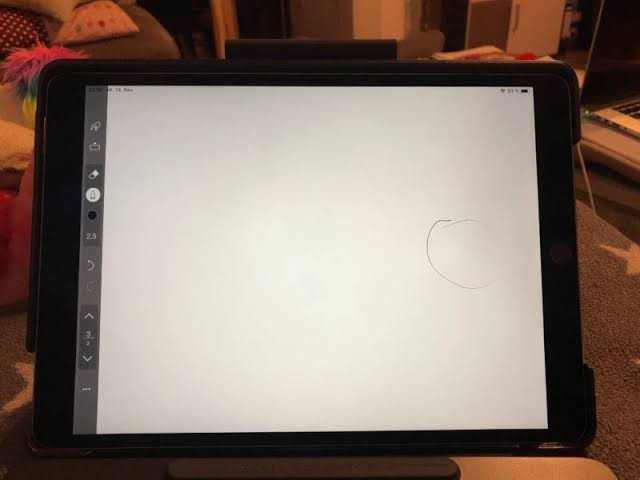
A bright spot on an iPad display can be frustrating, especially when it appears out of nowhere and refuses to go away. Whether it looks like a glowing dot, a patch of uneven brightness, or a small “light leak” area, this issue is more common than many users realize across devices from Apple.
The problem is often tied to hardware pressure, backlight inconsistencies, or internal display layer defects. In some cases, it’s harmless; in others, it signals early display failure.
This guide breaks down what causes iPad bright spots, real user-reported experiences, technical errors, and practical fixes you can try before heading to a repair center.
What Is an iPad Bright Spot?
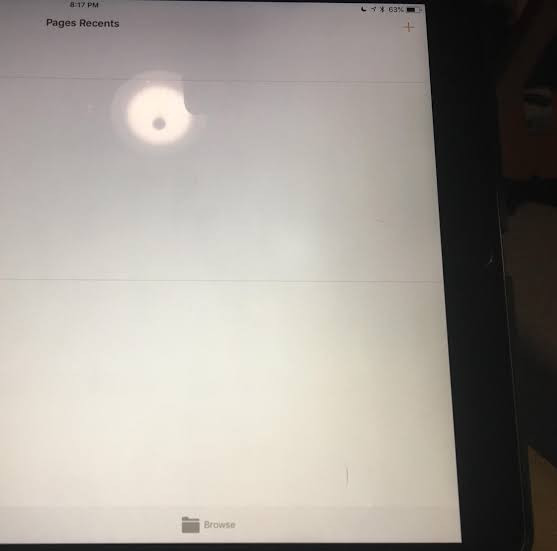
A bright spot is an area on the LCD or mini-LED display that appears:
- Brighter than surrounding pixels
- Static (does not move with content)
- Visible on dark backgrounds more clearly
- Sometimes circular or irregular in shape
It is not a software glitch; it is almost always related to display hardware behavior.
Main Causes of iPad Bright Spot Issues
1. Pressure Damage on the Display Layer
One of the most common causes is physical pressure:
- Carrying iPad in tight backpacks
- Sitting or leaning on the device
- Improper cleaning pressure
This pressure affects the LCD backlight diffusion layer, creating uneven brightness zones.
2. Manufacturing Backlight Inconsistency
Even brand-new devices can show slight variations due to:
- Backlight uneven distribution
- Faulty diffusion sheets
- Panel calibration inconsistencies
This is more noticeable in darker rooms or low brightness settings.
3. Heat Exposure
Excessive heat can damage internal layers:
- Gaming for long sessions
- Charging while under heavy use
- Leaving iPad in hot environments
Heat can cause localized backlight bleaching over time.
4. Display Layer Delamination
This happens when internal layers slightly separate:
- Backlight layer
- LCD panel
- Adhesive bonding layers
It creates a glowing patch that becomes more visible over time.
5. Manufacturing Defects (Rare but Real)
Some units may ship with:
- Uneven LED backlighting
- Defective light guide plates
- Pressure-sensitive panel areas
These issues often appear within the first few months of use.
Common User-Reported Complaints
Based on recurring discussions across tech communities, users commonly report:
- “A glowing white patch near the corner after a few months”
- “Brightness spot only visible on dark mode”
- “Spot got worse after dropping iPad slightly”
- “Apple diagnostics say everything is fine, but issue persists”
- “Brightness unevenness after charging overnight”
A key pattern seen in user feedback:
Bright spots often don’t affect touch functionality, which makes them harder to diagnose as critical failures.
Bright Spot on iPad – Fixes
Try these tests:
1. Dark Screen Test
- Open a black image or enable dark mode
- Lower brightness to 20–40%
- Observe if spot becomes more visible
2. Full White Screen Test
- Use Notes app or a blank page
- Check if spot disappears or blends in
3. Screenshot Comparison
- Take a screenshot
- If the spot does NOT appear in the screenshot → it’s hardware, not software
4. Pressure Check
- Gently press around the area (do NOT apply force)
- If brightness changes slightly → likely backlight layer issue
Common Error Misconceptions
Many users assume:
“It’s a software bug”
Reality: Bright spots are rarely software-related.
“A factory reset will fix it”
Reality: Reset does not affect hardware backlight issues.
“It will disappear over time”
Reality: It usually stays or slowly worsens.
Proven Fixes & Solutions
1. Reduce Screen Brightness Usage
Not a fix, but helps slow progression:
- Avoid max brightness for long periods
- Enable auto-brightness
2. Avoid Heat Stress
- Do not game while charging
- Keep device in ventilated areas
- Avoid direct sunlight exposure
3. Case and Pressure Protection
- Use rigid protective cases
- Avoid stacking heavy items on the device
- Store flat, not bent
4. Software Adjustments (Temporary Visual Relief)
These do NOT fix hardware but may reduce visibility:
- Enable True Tone
- Use Night Shift
- Adjust contrast accessibility settings
5. Professional Repair or Screen Replacement
If the bright spot:
- Grows over time
- Appears after drop damage
- Is clearly visible on all backgrounds
Then the only real fix is:
- Display replacement
- Or full screen module replacement
When You Should Contact Apple Support
You should consider repair if:
- The device is under warranty or AppleCare+
- A bright spot appeared suddenly
- It affects viewing experience
- It is spreading over time
Apple typically treats this as a display hardware issue, not software.
Prevention Tips (Long-Term)
- Avoid pressure on screen (most important)
- Use a protective case with flat support
- Keep away from heat sources
- Do not bend or store under heavy items
- Avoid prolonged max brightness usage
FAQs
1. What exactly causes a bright spot on an iPad screen?
A bright spot is usually caused by hardware-related issues, not software. The most common reasons include:
- Pressure on the LCD layers
- Uneven backlight distribution
- Heat damage over time
- Minor manufacturing defects
Most users report that it often appears after drops, pressure, or long-term use.
2. Can a bright spot go away on its own?
In almost all cases, no.
Users frequently mention that:
- The spot stays the same for weeks or months
- In some cases, it slowly becomes more visible
Temporary visibility changes can happen due to brightness settings, but the defect itself does not self-repair.
3. Is an iPad bright spot a serious problem?
It depends on severity:
- Small spots: mostly cosmetic
- Growing or multiple spots: display degradation
Many users describe it as “annoying but usable,” while others report worsening over time after drops or pressure.
4. Does Apple repair bright spot issues for free?
Based on user experiences shared online:
- If under warranty or AppleCare+, replacement is more likely
- If caused by physical damage, it is usually treated as accidental damage
Outcomes can vary depending on diagnosis at the service center.
5. Can software updates fix bright spots?
No.
A common misconception on Reddit is that updates might fix display issues, but bright spots are hardware-based backlight problems, not software glitches.
6. Why is the bright spot more visible in dark mode?
This happens because:
- Dark backgrounds highlight uneven backlighting
- LCD or mini-LED layers show inconsistencies more clearly in low light
Many users notice the issue mainly at night or in dark mode apps.
7. Does pressure from a case cause bright spots?
Yes, it can.
Several users report bright spots after:
- Tight-fitting cases
- Carrying iPads in backpacks
- Sitting or applying pressure on the device
Even light pressure over time can affect internal display layers.
8. Can I fix a bright spot at home?
There is no reliable DIY fix. However, users sometimes try:
- Reducing brightness usage
- Avoiding heat exposure
- Using display adjustments or accessibility settings
These only reduce visibility, not remove the issue.
9. Will the bright spot get worse over time?
Based on repeated user reports:
- Some cases remain stable for years
- Others gradually expand, especially after heat or pressure exposure

Similar Posts
Is Zoho Project Management Software the Right Choice for Your Business?
5 Smart Strategies to Drive ROI with CRM Users Email List in Account-Based Marketing
How to Unfreeze Cryptocurrency? Unlock Your Digital Wealth Quickly