
Turning PDFs Into Presentations Is Frustrating — Here’s How AI Finally Makes It Easier in 2025
If you’ve ever tried converting a long top 5 Turning PDFs into a clean, professional slide deck, you already know the struggle. You spend more time wrestling with formatting, copying text, fixing spacing, and creating layouts than actually preparing your message. And the worst part? No matter how long you work on it, the deck still ends up feeling like a rushed, last-minute project.
I’ve been there too, staring at a 60-page PDF knowing I had 30 minutes to turn it into something presentable. That’s when I realised the real problem: PDFs aren’t designed to become slides, and manual conversion is a time sink that drains creativity before I even begin presenting.
That’s exactly why AI slide generators have become useful—not hype, not magic, but genuinely practical. They cut out the repetitive work, so you can focus on what matters: shaping the narrative and delivering the ideas clearly.
Why Converting PDFs Into Slides Takes Too Long
Let’s be honest—PDFs are rigid. They lock formatting, merge text blocks, break up sentences in odd places, and refuse to copy cleanly. When you paste text into PowerPoint, you get:
- chaotic alignment
- broken bullet points
- inconsistent spacing
- paragraphs that don’t belong on slides
You end up redesigning everything from scratch.
That’s the friction AI tries to remove.
How AI Actually Turns a PDF Into a Slide Deck
AI slide generation isn’t just “click and magic happens.” There’s a real process behind it, and once you understand it, the output makes much more sense.
How AI reads your PDF (simple explanation):
- The system scans your PDFs and extracts text.
- It identifies headings, subheadings, and topic changes.
- It summarises long paragraphs into shorter, slide-friendly lines.
- It groups content into logical slide sections.
- It applies a clean layout to make the deck readable.
When I first saw this process in action, it struck me how much time it actually saves—not because the AI is “smart,” but because it removes the repetitive tasks that slow me down.
Where AI Helps—and Where It Still Needs You
AI isn’t replacing you. It’s removing the parts of the job that don’t require your creative thinking.
A Realistic Comparison Table
| Task | AI Handles | You Handle |
| Extracting text | Quickly | Fixing odd breaks |
| Structuring sections | Mostly accurate | Reordering for clarity |
| Summarising paragraphs | Very well | Ensuring nothing important is lost |
| Choosing layouts | Basic templates | Visual styling and branding |
| Handling diagrams & heavy tables | Limited | Manual cleanup |
So yes, AI speeds things up—but you still own the message.
Using the WorkPPT AI Slide Generator in a Practical Workflow
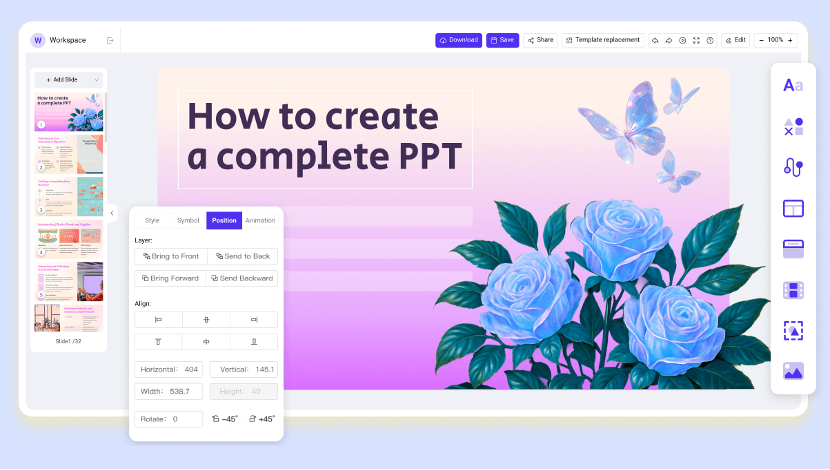
If you work with long PDFs regularly, the WorkPPT AI Slide Generator can handle the heavy lifting. You upload the PDF, the system scans it, identifies the structure, summarises the content, and produces a first draft of your PPT. You then continue adjusting the deck based on your style and the audience you’re presenting to.
This is the step that turns a “robotic AI output” into an effective human presentation—because slides still need your intention behind them.
Refining Your Deck Inside WorkPPT
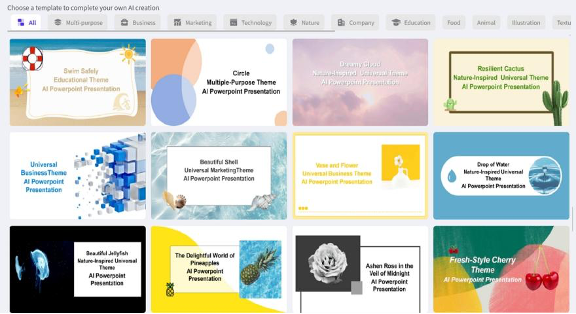
Once the draft is generated, you switch to WorkPPT to refine the design, rewrite lines, adjust layouts, or add images. Most users treat this stage like polishing a rough draft—cleaning up the flow, improving clarity, and making sure the final deck communicates the message properly.
This two-step workflow makes the entire process smoother. AI takes care of the structure; you take care of the clarity.
Five Pain Points AI Removes Immediately
Here’s where AI genuinely feels like a relief. It eliminates the tasks that make people dread slide creation:
1. Copying text manually from PDFs
AI extracts everything in seconds.
2. Rewriting paragraphs into readable points
It condenses content without losing the core meaning.
3. Figuring out where each slide should start and end
AI can identify natural section boundaries.
4. Cleaning up chaotic formatting
Spacing, fonts, and indentation become instantly consistent.
5. Beating the clock
When you’re pressed for time, a rough draft is far better than a blank slide.
I’ve seen people waste two hours on formatting a single slide. AI solves that instantly.
What You Still Need to Watch Out For
To keep this realistic: AI isn’t perfect.
- Scanned PDFs with low quality confuse OCR.
- Complex tables may need manual editing.
- Diagrams sometimes lose accuracy.
- AI summaries occasionally oversimplify technical content.
And one more important thing:
If your PDF contains sensitive data, always check the privacy policy before uploading it to any tool.
Final Thoughts Turning PDFs : AI Gives You a Starting Point—You Shape the Message
AI slide generators don’t replace presenters. They remove the tedious groundwork that slows you down. Whether you use the WorkPPT AI Slide Generator or other AI tools, the real benefit is the same:
You stop wrestling with formatting…
You stop fighting with PDFs…
And you start focusing on what actually matters:
what you want to say.
AI gets you to the “draft stage” in minutes.
You turn that draft into a meaningful presentation.
That’s the real power of AI slide generation in 2025.
Similar Posts
Discover the Secret to a Perfectly Sharp Presentation
Risk-Based Vulnerability Management: What to Fix First (With a Simple Model)
Google Nest Hub 2 Review: A Complete Look at Google’s Smart Display Upgrade